- Vodafone Community
- Internet & Festnetz
- Störungen im Kabel-Netz
- High Latency 20s - CableMax - Model CGA6444VF
- RSS-Feed abonnieren
- Thema als neu kennzeichnen
- Thema als gelesen kennzeichnen
- Diesen Thema für aktuellen Benutzer floaten
- Lesezeichen
- Abonnieren
- Stummschalten
- Drucker-Anzeigeseite
Frage
Antwort
Lösung


- Als neu kennzeichnen
- Lesezeichen
- Abonnieren
- Stummschalten
- RSS-Feed abonnieren
- Kennzeichnen
- Anstößigen Inhalt melden
am
09.03.2022
00:46
- zuletzt bearbeitet am
09.03.2022
07:37
von
 Grit
Grit
Hi, I get this new network account 1.5 weeks ago for my new apartment.
- Video call, mobile call via WIFI disconnected every 2 minutes. my friends complain my network is too bad to see and hear me.
- online game is not possible
- Twitter doesn't show images and videos, loading takes around 20 seconds, happens every 5-10 mins,
- Google Translate slow response(20 seconds), especially for real-time translate
- Netfilx on TV is loading sometimes, TV use LAN/cable, video works better as it is not real-time service, but if I use mobile data or neighbor's wifi -> no latency
The above problems happen on all my devices/phones. disappear when I change to mobile data or neighbor's WIFI.
I've tried cutting down router power for 1 hour, resetting the router, reconnecting the cable, re-install the cable socket. none of them work.
Please suggest what I can do, or how to cancel my account. thanks a lot.
- In which state do you live? Please also send the zip code 14480 Potsdam
- What contract do you have? (e.g. internet + telephone 100) cableMax 1000M Kunden-Nr. ***
- Which modem/ router are you using? (e.g. Hitron) CGA6444VF
- Do you use a rental device from us or do you have your own device ? rental device
- Which error occurs? (Speed too low; packet loss) Also send screenshots of speed tests (with date and time) and tracerts/ping plotter measurements in the event of packet loss or ping problems. Set the ping plotter to 2.5 seconds for the interval and use affected services as the target.
- How is your device connected to the modem ? ( LAN; WLAN; additional router; PowerLAN ) WLAN & LAN
- Which browser do you usually use? (e.g. Firefox) Chrome
- Which operating system do you have on your computer? (e.g. Windows) MacOS, Android, IOS
- Start and period of the disruption (e.g.: since the beginning of April; only in the evening) Since I have this network (1.5 weeks ago)
- Also upload a screenshot of the signal values . You can find this in the user interface of your cable router via 192.168.0.1 or via 192.168.178.1 on the Fritzbox.


- What measures were taken by the fault hotline (available on 0800-5266625 for Vodafone Kabel Deutschland or 0221/46619100 for Vodafone West)? I failed to get through the service as I only speak English now.

- Als neu kennzeichnen
- Lesezeichen
- Abonnieren
- Stummschalten
- RSS-Feed abonnieren
- Kennzeichnen
- Anstößigen Inhalt melden
am 09.03.2022 13:55
Hello 23hp,
have a look at your first ping plotter. It is not complete. You could scroll down the page to make it complete.
I need that please.
Greetings Moni
- Als neu kennzeichnen
- Lesezeichen
- Abonnieren
- Stummschalten
- RSS-Feed abonnieren
- Kennzeichnen
- Anstößigen Inhalt melden
am 09.03.2022 14:02
Hi Moni,
Do you mean this?


- Als neu kennzeichnen
- Lesezeichen
- Abonnieren
- Stummschalten
- RSS-Feed abonnieren
- Kennzeichnen
- Anstößigen Inhalt melden
am 09.03.2022 16:14
Selbsthilfe
Die aufgeführten Links sind informativ - keine VF Produktionen - und Wert gesehen zu werden.
Bei schlechten WLAN Empfang, schaue dir dieses Video an.
Erklärung zu Docsispegel, schaue dir dieses Video an.
Vorgaben zum Docsispegel hier
Hast du eine Fritzbox und du bekommst keinen 1Gbit/s Speed, prüfe deine LAN Geschwindigkeit, schaue dir dieses Video an.
Enthält dein Routerlog einen Eintrag Utopia, oder ein Blockieren bzw. stehen Drops von WAN/LAN an?
Probleme am Anschluß können nur unter Verwendung einer LAN Verbindung beurteilt werden.
_______________________________________________________________________________________
Selbst mit einer polierten Glaskugel lässt sich dein Anschluss nicht ohne deiner Mithilfe begutachten.
Bitte beantworte diese Fragen:
PLZ/Bundesland:
Tarif:
Leihrouter/Eigener Router:
Weiteren Router im LAN:
Bridge Mode:
Wichtig: Den kompletten Docsispegel Down- und Upstream posten.
Speedtest: 5 (fünf) Speedtests von speedtest.net als multiuser mit LAN.
5 (fünf) Speedtests von speedtest.net als singeluser mit LAN.
Multimode baut 4 Verbindungen zum Speedserver auf, Singlemode nur eine.
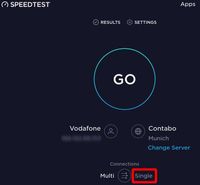
Nach den Speedtest liegen die Ergebnisse unter "Results" auf der Website vor.
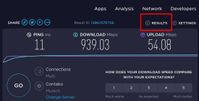
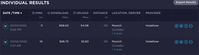
Nur die "Resuls" aus den 10 (zehn) Speedtests im Singel- sowie Multimode sind von Interesse.
Ein einzelner Speedtest ist nicht aussagekräftig!
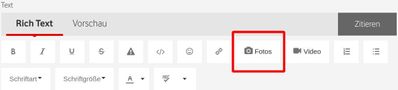
Speichere "Results" als Screenshot und füge es als Foto, 4tes Icon von rechts, ein. Es können mehere Fotos eingefügt werden.
Sofern es vom Router Logs gibt, bitte posten.
Um ein IPv6 Problem auszuschließen führe diesen Test durch, bitte posten.
Daher abweichend vom VF Fragebogen, führe einen MTR Test - für MacUser hier -, jeweils für IPv4 sowie IPv6 für für das Ziel heise.de für 30 Minuten aus. Die Ergebnisse bitte posten.
______________________________________________________________________________________
Falls eine graphische Darstellung erwünscht ist.
Der von VF empfohlende Pingplotter ist eine 14 tägige Test Version und kann max. 10 Minuten aufzeichen. Die Vollversion kostet $40.
Ich empfehle den kostenlosen pingtracer für M$ User, zip Datei downloaden, entpacken und starten. Es können Langzeittrends erstellt werden, mit der Taste „Bild ⬇“ können alte Daten abgerufen werden.

Falls du einen nachgelagerten Router in Betrieb hast, muß dein VF Router den Bridge Mode aktiviert haben. Falls nicht, schließe deinen PC an deinem VF Router an. Stichwort Doppel-NAT
Userban wg. wiederholter Missachtung der Forenregeln. Gruß, das Mod-Team
- Als neu kennzeichnen
- Lesezeichen
- Abonnieren
- Stummschalten
- RSS-Feed abonnieren
- Kennzeichnen
- Anstößigen Inhalt melden
am 09.03.2022 21:38
Hi Kieferer,
Hers are the info I have , tests result are base on LAN
PLZ/Bundesland: 14480 Potsdam
Tarif: CableMax 1000M
Leihrouter/Eigener Router: Vodafone Station inkl. WLAN. Standard WLAN-Kabel-Router
Weiteren Router im LAN: No, this is the only one
Bridge Mode: ausgeschaltet
====================
Speedtests

Um ein IPv6 Problem auszuschließen führe diesen Test durch, bitte posten.

Ziel heise.de für 30 Minuten aus. Die Ergebnisse bitte posten.
See next comment
- Als neu kennzeichnen
- Lesezeichen
- Abonnieren
- Stummschalten
- RSS-Feed abonnieren
- Kennzeichnen
- Anstößigen Inhalt melden
am 09.03.2022 22:13

- Als neu kennzeichnen
- Lesezeichen
- Abonnieren
- Stummschalten
- RSS-Feed abonnieren
- Kennzeichnen
- Anstößigen Inhalt melden
09.03.2022 23:54 - bearbeitet 10.03.2022 00:11
Well done. LAN and IPv6 is working well.
There aren't any drops in IPv6 for the target nor for the VF Servers. The losses somewhere between are to ignore, due to firewall policies of some network devices.
Are you willing to perform the same mtr test for IPv4?
I do assume the command will be mtr -4 heise.de. So it would be for Linux.
If so, please post the result.
If you notice a different amount of drops as seen in Ipv6, stop here.
When successfully done repeat the same test with WiFi. To do so your device need a good signal strength.
Userban wg. wiederholter Missachtung der Forenregeln. Gruß, das Mod-Team
- Als neu kennzeichnen
- Lesezeichen
- Abonnieren
- Stummschalten
- RSS-Feed abonnieren
- Kennzeichnen
- Anstößigen Inhalt melden
am 10.03.2022 11:51
Hi Kieferer, these are rest results, thanks


- Als neu kennzeichnen
- Lesezeichen
- Abonnieren
- Stummschalten
- RSS-Feed abonnieren
- Kennzeichnen
- Anstößigen Inhalt melden
10.03.2022 13:01 - bearbeitet 10.03.2022 13:19
Nicely done, even again IPv4/6 Tests in one Post. Thanks
Conclusion LAN/WLAN Test IPv4: There are small Packetlosses in IPv4 at the VF Gateway - directly after your router - visable. This shouldn't be. The worst ping at the Gateway have been 311.8ms, the avg is OK. Nevertheless there have been more spikes occurred since the sigma is still 57.4 even with 1644 samples.
If you are for a further investigation interested use the pingtracer for 30min, pingplotter is limited to 10 Minutes.
At the Target there isn't any PL noticeable. So everything fine for the Target.
Conclusion IPv6 Test: Looks better. There are less spikes, see worst and st.dev.
In LAN/WLAN aern't any PL to the target "heise.de", neither in IPv4 nor in IPv6.
So I assume something fishy either with the router Firmware or android.
Is there a log entrance called Utopia, if so, this would be a cause for your troubles.
If you use Android devices, if so, turn off - as workaround - Private DNS in your android device. Not sure if this router can handle DoH, DoT.
Drop outs in a frequency of 2 min are not seen.
Twitter use a IPv4 address VF natively IPv6
Google Translate, 20sec. Yes sometimes me too. Try deepL as reference. This maybe not a solution, but better as google. At moment the peering to google doen't look so good and I won't ask VF why. 
Blue Bars are PL's

Online game, special topic. I'm far too old for this
You have to specify.
Do you have a 2nd router?
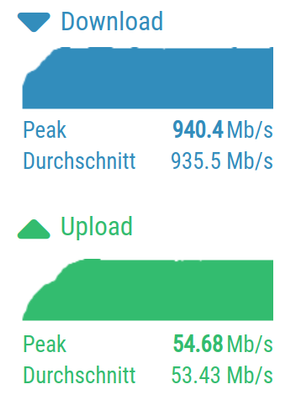
Ca you post a screenshot done from this site. I'm interesed in the Upload/Download graph
"Netfilx on TV is loading sometimes, TV use LAN/cable, video works better as it is not real-time service, but if I use mobile data or neighbor's wifi -> no latency"
Maybe better to describe it a bit more in detail.
Userban wg. wiederholter Missachtung der Forenregeln. Gruß, das Mod-Team
- Als neu kennzeichnen
- Lesezeichen
- Abonnieren
- Stummschalten
- RSS-Feed abonnieren
- Kennzeichnen
- Anstößigen Inhalt melden
am 10.03.2022 13:29
The screenshot should look like this.

Userban wg. wiederholter Missachtung der Forenregeln. Gruß, das Mod-Team
- Als neu kennzeichnen
- Lesezeichen
- Abonnieren
- Stummschalten
- RSS-Feed abonnieren
- Kennzeichnen
- Anstößigen Inhalt melden
am 11.03.2022 00:38
Hey Kieferer,
It's not the problem of my android phone, I'm a senior software developer. that's why I can dig so deep.
Thanks for provide the clue.
I think the problem comes from the router firmware, casue the WIFI not working properly.
I can eaily reproduce my issue via twitter or google translate. so I tried:
1. connect to LAN, issue gone
2. connect to SSID Homespot from same router, issue gone
3. connect to WIFI from a sub-router, issue gone
4. disable 2.5GHz or 5GHz in vodafone router , problem still happen
It makes me recall my last apartment, all tenants has a sub-router connect to Vodafone router(same model as mine), as the wifi from it is not reliable. I belive this is a known issue for a long time.
I require a full refund for the interet account, include the fee for turn device back.
I opened it 2 weeks ago, but takes half of the time troubleshooting and fix it. it cost me more than this vodafone account take.. My life shouldn't spend on a known issue.
Please help, thanks

- « Vorherige
-
- 1
- 2
- Nächste »
- IPv6 Host Exposure funktioniert nicht in Geräte
- Onlineshooter unspielbar (CS2) extreme lags in Störungen im Kabel-Netz
- Volle Leistung am Router aber nur 10-20% am Gerät in Störungen im Kabel-Netz
- Störung der Kabel-Internet-Dienste in Störungen im Kabel-Netz
- Kabel - Störung der Internetverbindung in Störungen im Kabel-Netz
